Arduinos in the Classroom ?

This is an answer to Sylvia’s blog post:

http://sylviamartinez.com/getting-started-should-i-buy-arduinos-for-my-classroom/?fb_action_ids=10153108316628124&fb_action_types=news.publishes

I would say from my perspective with a yes and a no (in German it is called “Jain”). It depends largely on how old the students and what is the current key content in the classroom. In classes with younger students it is certainly much better to use the customized kits of Hummingbird or littleBits. I have made excellent experience with the Arduino in classes with older students. Especially the issues of scalability was for us an important question : What does that mean, I start with the kits listed above, and use the experience later in ambitious projects on a similar hardware base. (Hummingbird and littleBits can be programmed Arduino-like). I can use different approaches to programming (switch between Scratch and Arduino programming language).

Important for a transition is mainly the question of the software in use. In the Arduino ecosystem, we use a combination of the software Fritzing, ScratchforArduino and of course the Arduino IDE.

One Thing is, you have to learn the correct use of wires and breadboards to design a proper circuit. Certainly you can not do so much wrong with adapted kits. On the other hand Fritzing has become so well-developed that many projects can be well understood. We use here mainly the Fritzing Creativity Kit.

A help in dealing with breadboards:

An intermediate step to avoid faulty wirings is the Grove system of connectors by Seedstudio. There some beginnings to incorporate this into the Fritzing-Environment:

Tthere are numerous modules with grove-connectors, which can be docked to an Arduino, it can also be integrated even for future projects in a Raspberry Pi.

Back to the Arduino-Ecosystem we have to look at the needed Hardware. The adapted kits includes matching modules (Sensors,LED’s, buttons …). The Arduino use in most cases standard electronic components.

That’s from time to time a disadvantage, although ‘obtaining’ but can also be tackled differently.

We get these components in which we disassemble old devices with students and unsolder the relevant components. This works very well with younger classes, One Example are the well known brushbots be tinkered from old cell phones. Even in a short time, a conglomeration of components collected together, which can be used in other projects.

The decision which tool or kit you use in your classroom it’s always a question of a limited available budget and to find a balance between the various approaches. I think it’s useful to have a scalable hardware base in some cases, you can use with different ages of students. But the learning environment and strategy is much more important. And tools are changing from time to time.

OpenSCAD in a classroom

In the last school year, I initiated the 3D print workshop at the Montessori School in Potsdam. One of the common problems is which method can be used in the classroom to create 3D objects. In the subsequent 3d-print there are several good open source programs in which the print can be prepared. We use some Ultimaker² 3D printers in combination with the control program Cura (It is available for all popular platforms and relatively simple to set up). That should not be a problem.

For the 3D modeling often Tinkercad is selected as an entry point. In my case, i use very often parametric 3D modeling to “program” 3D models. Thats why i choose OpenSCAD. It was an experiment to use this approach immediately in the course. a big benefit is: OpenSCAD is available for all platforms and can then also be used as an open-source software at home. This is a part our School-Strategy switching to free available software in more and more working areas. but this is another story.

This includes the question: do we need manuals, to learn something new ? the idea behind is:

more than you want you need to dig into manuals to find the right information. Especially in the beginning when the first learning success is there and new things to be tried. If new programs or programming languages ​​should be learned, it can be useful that all of the basics fit on single-page the so-called Cheat Sheets. Our experience has shown a large part of projects can be realized with the reduced and compressed list of instructions on this single sheet of paper.


A good resource for this is http://www.cheat-sheets.org/. After a test-period last year, we now begin to develop our own cheat sheets to use this as a tool in the classroom.

In OpenSCAD 3D models are programmed, the language-syntax is modeled on Javascript or Processing. This means that the basic structures are similar to the Arduino language.

Basic geometric shapes are created in space and linked. It is important that a spatial thinking is trained in a 3D dimensional coordinate system and complicated structures based on simple geometrical objects.

It’s the same principle of any 3D modeling program. OpenSCAD offers a lot of commands. We have decided to restrict the amount of available commands. We need exactly seven:

  • Cube – creates a cuboid
  • Cylinder – creates a cylinder
  • Sphere – creates a sphere
  • Translate – moves an object
  • Rotate – rotate an object
  • Union – merges objects
  • difference – an object is subtracted from the other

Objects from everyday life should then be designed with these commands. Ultimately, I was surprised by the success of how quickly objects are created without any experience and then printed.

The setting of my class in this case is something special (not every day). I work in a so-called inclusion school. The scenario is up to 1/3 of my students are disabled persons. In the present case, this ranges from severe spasticity through to autism. Teaching is not a problem, we are working in small groups according to the skill-sharing principle.

The courses will be continued next year with two special background: “repair things with your own style” / “creating a school lab from the scratch”

Making it real – constructionism comes to life

The 2014/2015 FabLearn Fellows are a diverse group of 18 educators and makers. They represent eight states and five countries, and work with a wide range of ages at schools, museums, universities and non-profits. Throughout the course of the year, they will develop curriculum and resources, as well as contribute to current research projects. Their blogs represent their diverse experience and interests in creating better educational oportunities for all.

I’ve been privileged to mentor this group this past year and part of that is summarizing their amazing blog posts. Here are some blog highlights from May 2015.

Constructionism through Design Thinking Projects

Christa Flores shares a complete 5th grade science unit, including resources, benchmarks, assessments, student feedback, and videos of the completed projects. Teams of four uncovered needs, brainstormed, designed, engaged in peer critique, prototyped, built, and shared their projects at Maker Faire.

Continuing Series – The FabLab and Its Learning Dynamic

Nalin Tutiyaphuengprasertu continues her series about the Learning Dynamic of a FabLab, connecting theory with observations of various classes at the Bourn Idea Lab at Castilleja School with Ms. Angi Chau and Ms. Heather Pang.

  • In Part 3, she discusses the teacher’s role in an environment that allows more freedom and autonomy than a traditional classroom.
  • In Part 4, she talks about how teachers find balance in their relationships with students to create a level of trust without dependence.

Telegraph Project in History

A few months ago, Heather Pang wrote a blog post,  Where is the Line? about the line between instructions and letting students figure it all out in a history project about the telegraph and its impact on American history. This post, Telegraph Project in History, follows up after the project was completed, and Heather shares her thoughts about the results.

Making and National History Day

Heather Pang says that while,  National History Day (NHD) is a rather “old school” competition, she saw “the potential for deep research and thought, a good match with our department history “habits of mind” and a great opportunity for students to pick topics that they cared about.” Find out how she combined this “strictly constrained” assignment with open-ended processes that result in her students working like historians, not history students.

Making Stuff Light Up and Move!

Tracy Rudzitis outlines a sixth and seventh grade STEAM project on electricity. She shares the learning targets, project prompts, and student documentation of their work. Over 300 students completed their projects in a variety of ways with a wide range of materials from soft and paper circuits to MaKey MaKeys and Arduinos.


Constructionism through Design Thinking Projects

Design Thinking as Constructionist Learning, Lessons from a Spring Hard Problem

In the second semester of Problem based Science, my 5th graders are introduced to their “Spring hard problem.” The spring hard problem marks the end of our patterns unit and the beginning of our study of structures and systems through the lens of making and problem solving. During our study of structures, students get a chance to use their understanding of materials, measurement and patterns to make blueprints for novel designs and to conduct scientific testing of those designs. If those structures involve moving parts or varying materials or embedded electronics, they are also learning about the relatedness of things that make up a system. This year’s spring hard problem had a design thinking and sustainability twist. Below is an account of this 6 month long unit, the unit learning outcomes and student feedback regarding the process.

What makes a problem a hard problem?

Hard problems require time (months), collaboration, creativity, grit and learning new skills to pass a challenge. The true sign of a good hard problem is when the adults do not have all the answers for students, rather the students get to take charge using their own imagination and ambition to reach a goal set by their team.

This year’s title? Design Detectives for the Common Good! To learn about structures and systems, as well as collaboration between and within teams, the class of 2018’s spring hard problem consisted of the following rules or prompts:

[photo missing]

PbS Spring Hard Problem

Students work in t.e.a.m.s. of four, based off of resumes created after unit 1: (must cover 4+ colors) to accomplish the above rules or prompts.

Constraints … the game

  • materials: Must use wooden pallets or e-waste on campus

  • design: design must be sound and meet the need of your demographic

  • aesthetics and purpose: design must meet the need of the greater community (it must be beautiful/foster community/communication)

Shared Language (key terms/content)

KEY: TERMS in Blue are Hard Skills and Grey are Soft Skills or Communication

Goals and Benchmarks

Phase 1: 2-4 weeks

Get into t.e.a.m.s of 4 (must cover 4+ colors) and discover your case (listen, collaborate)

Learn your case’s story (observe, communication, empathize, documentation)

Find a need (diagnosis, pattern recognition, synthesis)

Formal Peer Critique Session #1: Share 3 needs you found!

Phase 2: 6-8 weeks

Brainstorm solutions to meet the needs you discovered (listen, ideate, divergent thinking)

Formal Peer Critique Session #2: Share your top ideas!

Design (convergent thinking, predict, blueprint making) and Build (measure, cut, aassemble, TinkerCad, CorelDraw) a working prototype

Informal Peer Critique Session #3: First prototype share!

Phase 3: 4-6 weeks

Test prototypes, Listen to and incorporate feedback from adults and peers, iterate on your prototype (collect testing results, analyze data, see patterns, use current data to move forward)

Phase 4: Share (communicate and tell your story at Maker Faire and craft a PASSING/FAILING w/HONORS claim that you passed all four rules and support all claims with evidence)

Assessment:

Our school gives end of year grades, the following skills are assessed for points. I give no tests or quizzes. 

Teams kept a daily log to keep track of their project on Googledocs, this is a digital process maker portfolio. At times of deep engagement, I took photos of their work and inserted them into the daily log and asked students to insert captions. At times they recorded independently. I checked them often and gave a summative grade every two weeks. Teams recieved points for sharing work during peer critiques. Individuals got points for writing or making a self-assessment which contained a claim of passing or failing, as well as a reflection of tools and skills practiced to solve problems during this unit.

Sample Projects Made by Students:
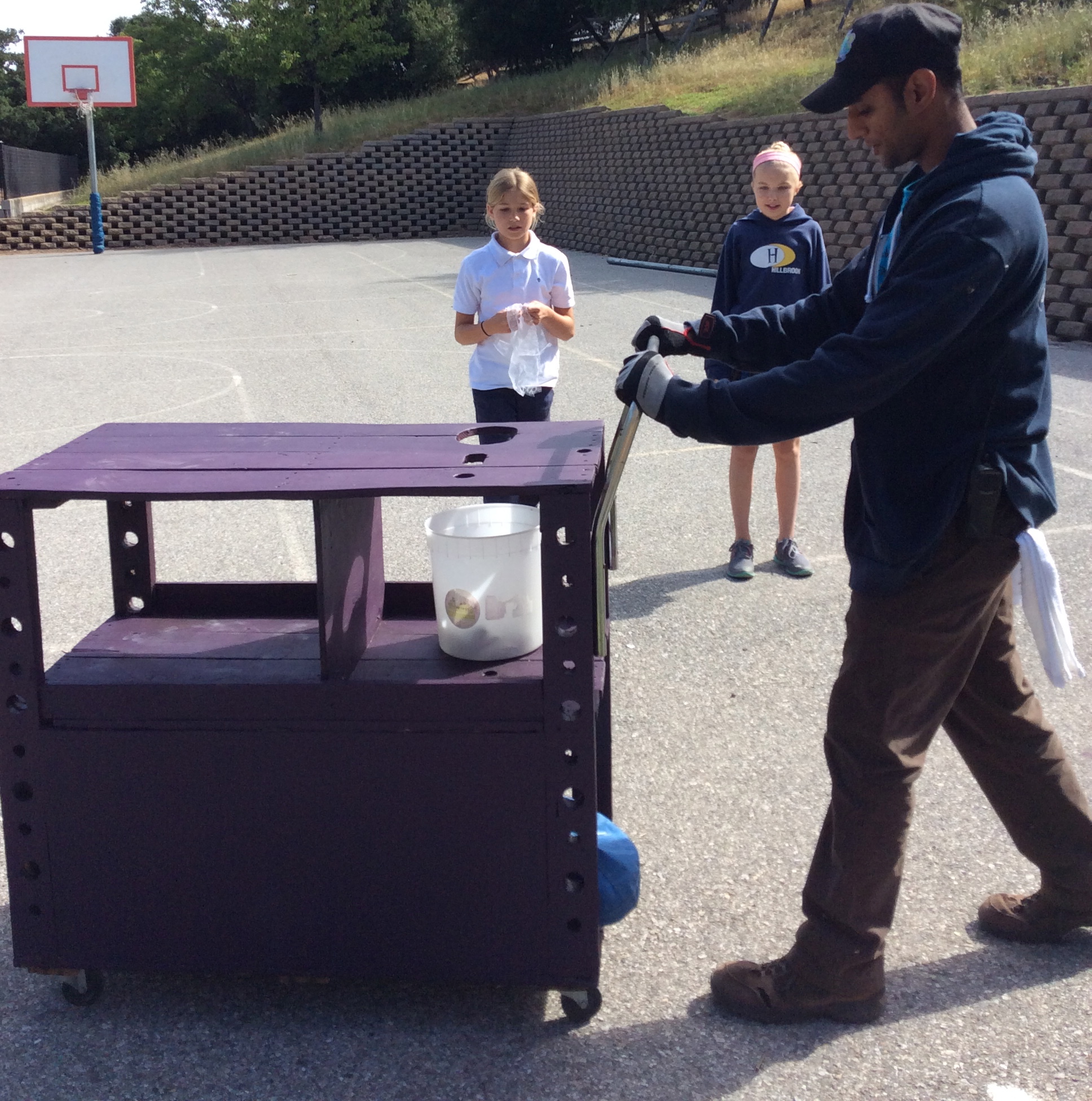
A cart made for maintenance staff member Dhimant by team “Golden Eagles.” His need was something inspirational that would help him collect lost and found.
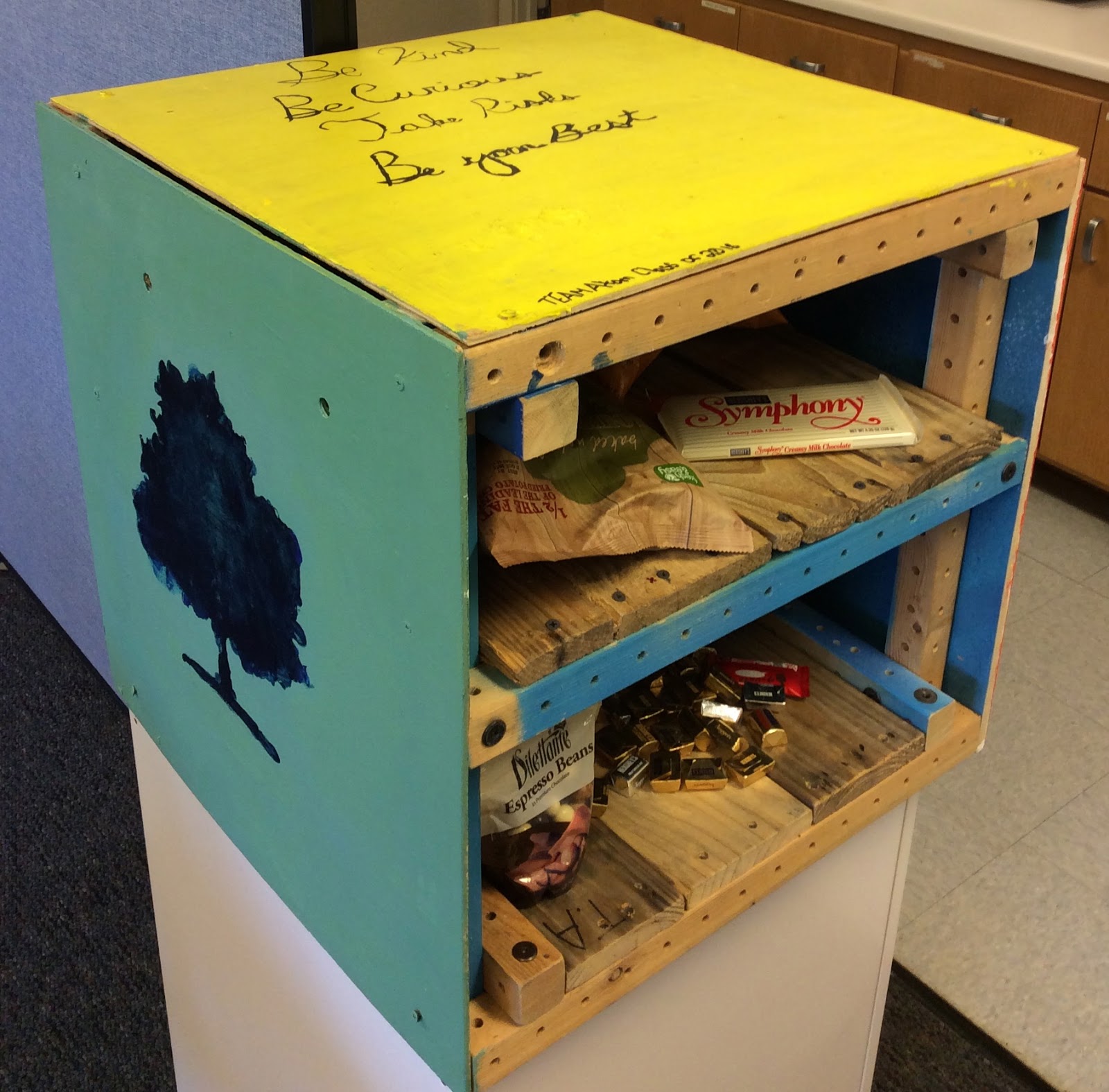
The Faculty Snack box made by Team Atom to form connections between peckish teachers.
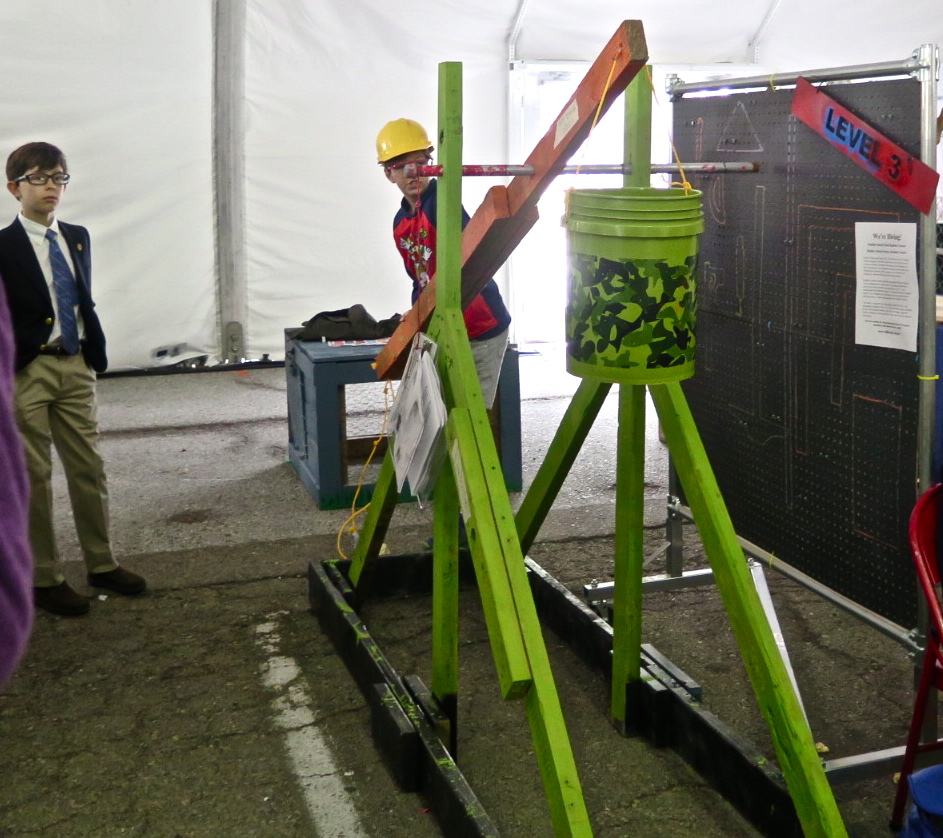
The Trebuchet made by the Trebuchet team for Ms. Flores’ Danger Playground prototype to teach SEL and physics, here shared at Maker Faire by student Eli.
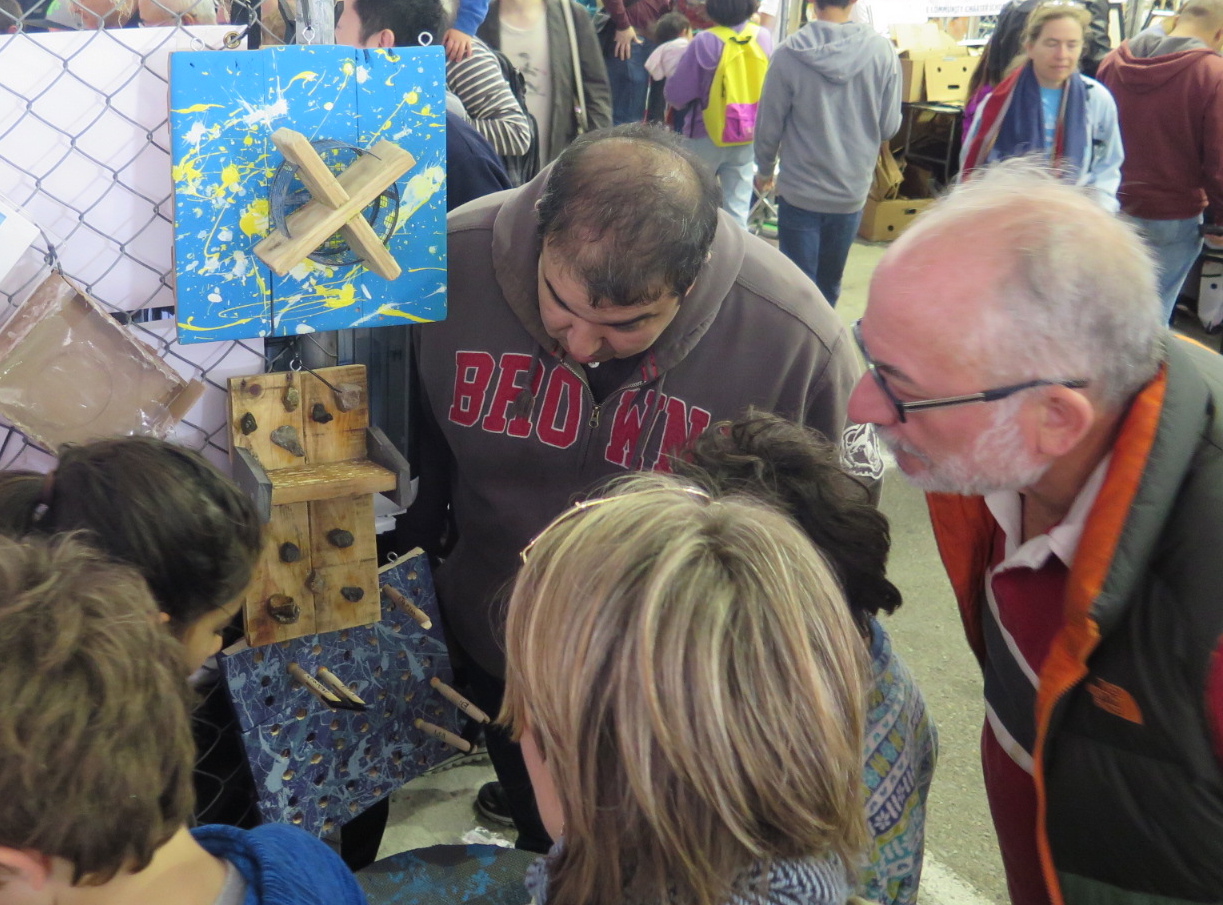
An interactive water board installation to demonstrate water flow and drought adaption to Kindergartners.
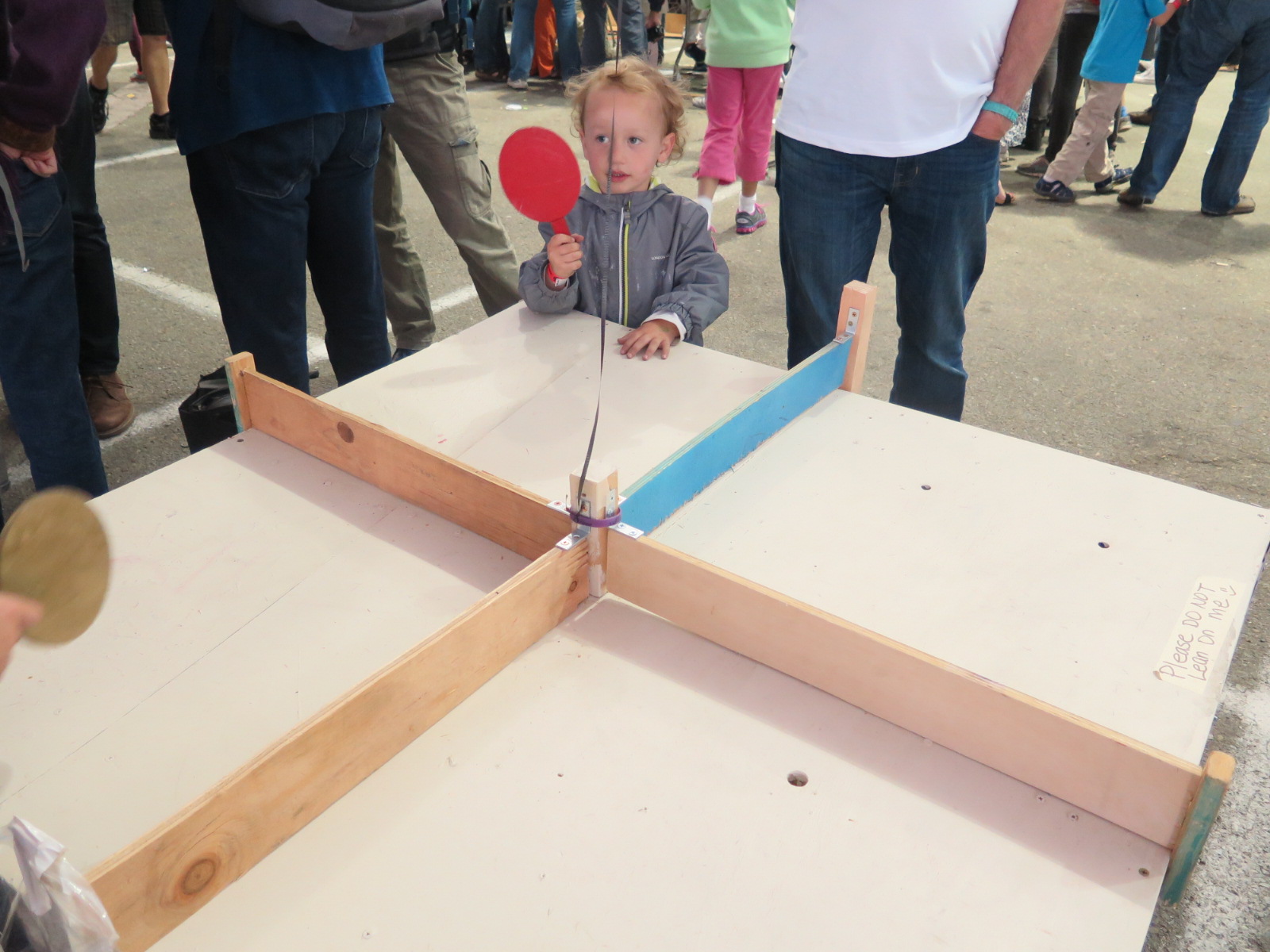
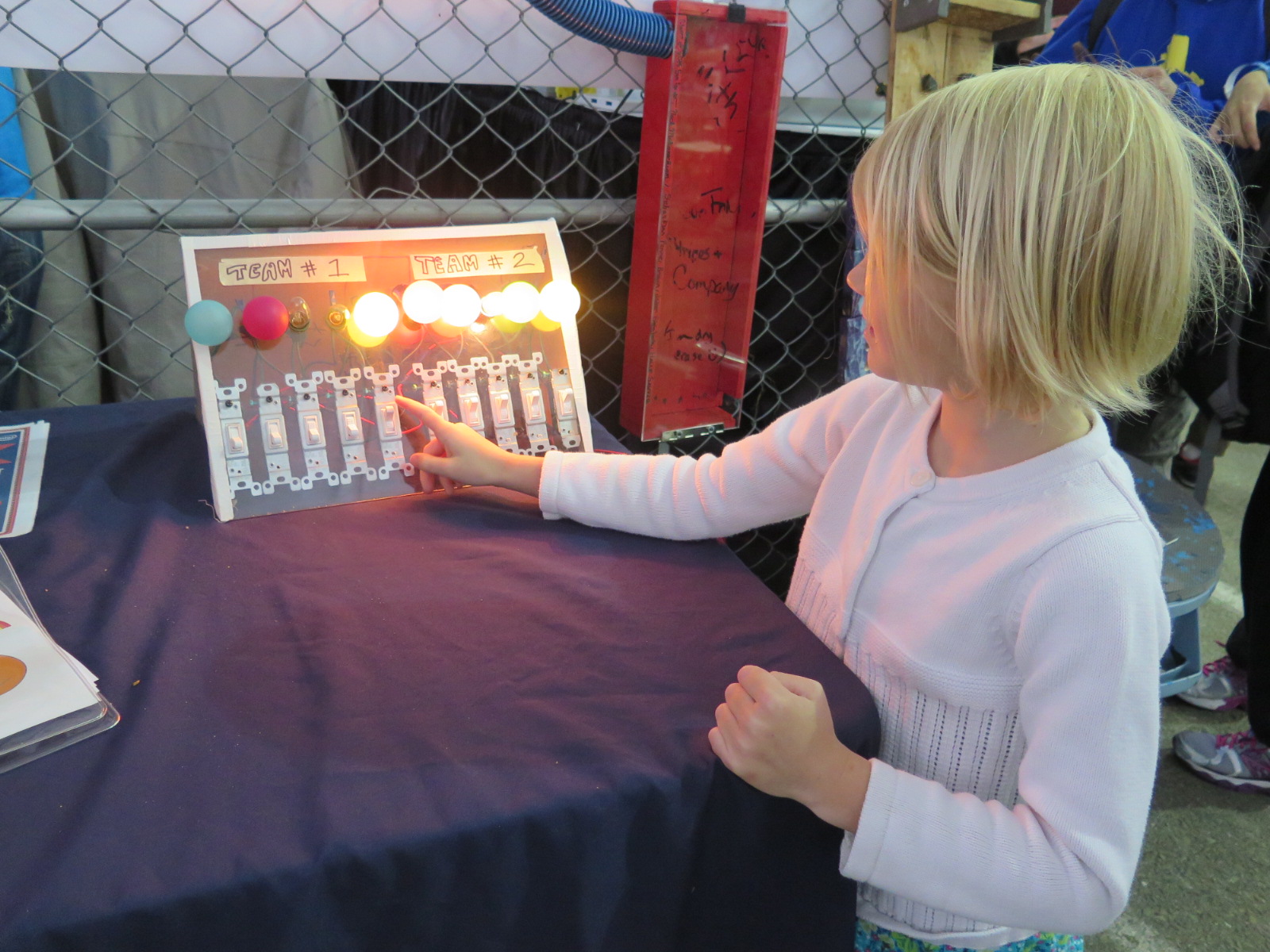
An interactive water board installation to demonstrate water flow and drought adaption to Kindergartners.
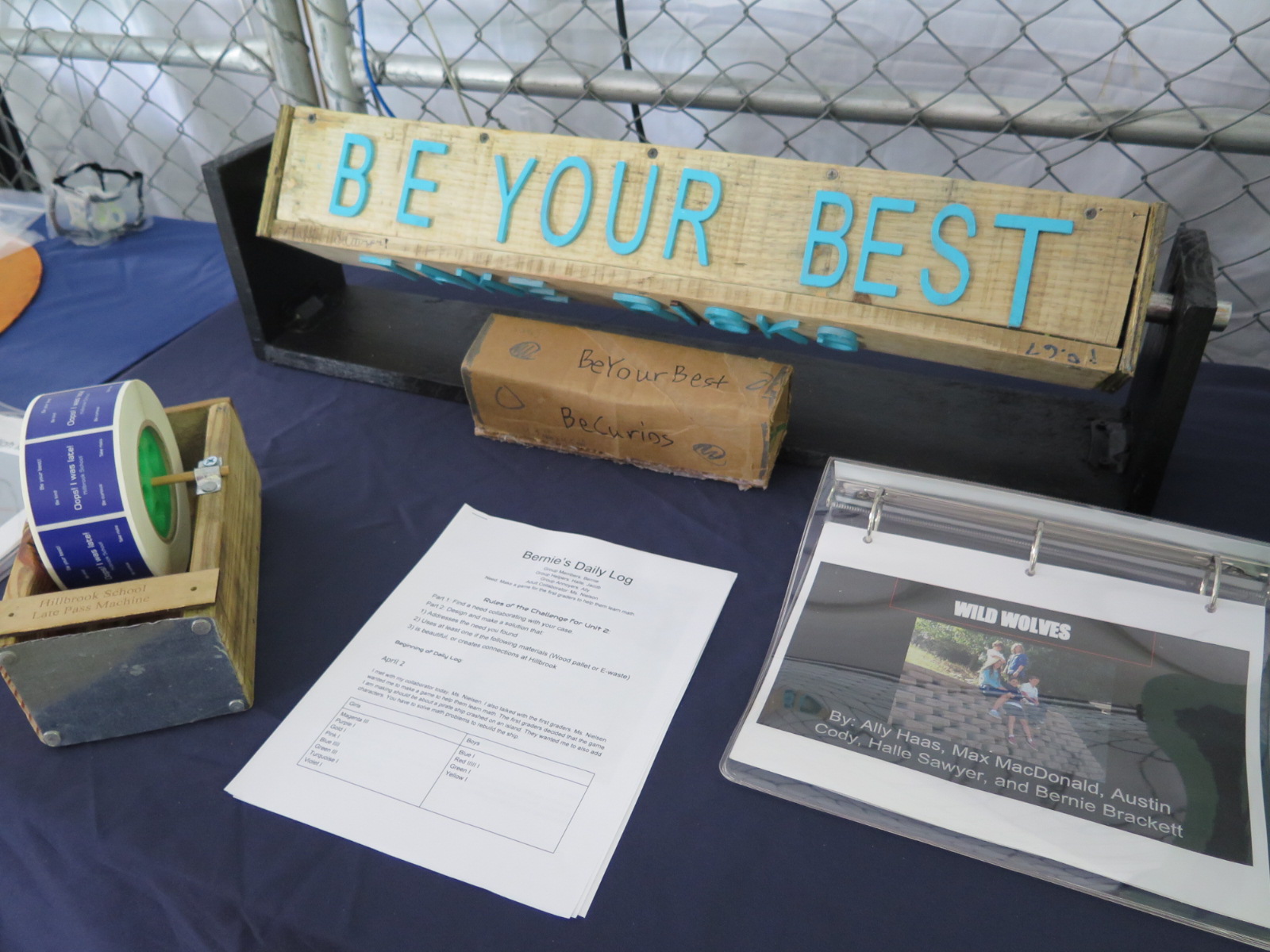
A new system for dispensing late passes (left) for front desk receptionist Ms. Chandler and the Inspiration Prism (back center) which you spin by hand to get the school motto of the day.


Student Feedback from process: (34 surveys collected from 10-11 year olds)

I still need to code and analyze much of the data, but when asked for feedback on this hard problem where students needed to work in the same teams for six months, some students had this to say;

“I learned that you have to be very patient.”

“I learned that everyone has different talents and that we need to use them all.”

“I learned how to solve problems and talk about different options.”

“I learned working in a group is not always easy. My group had a lot of disagreements.”

When given a list of the following skills:

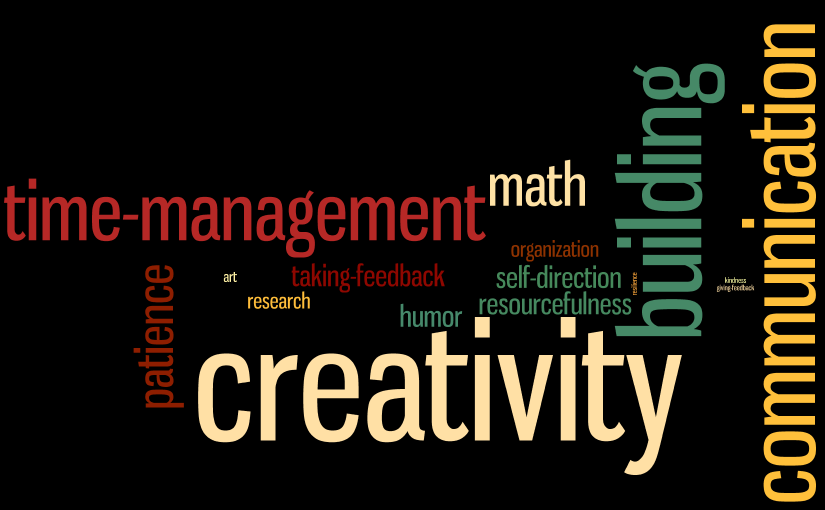
Resilience, Patience, Creativity, Communication, Sense of Humor, Building, Math, Art, Time Management, Organization, Resourcefulness, Kindness, Taking Feedback, Giving Feedback, Research, Self-Direction

and asked to select the top three used to survive this unit, students produced the following data visualization from their choices:
Helpful Reading:

Scheer, Andrea, Christine Noweski, and Christoph Meinel. “Transforming constructivist learning into action: Design thinking in education.” Design and Technology Education: an International Journal 17.3 (2012).
FabLab and Its Learning Dynamic (Part 4/5) – Teacher’s role (continue)

Well balance of affection and learning. Lave and Wenger (1991) state that the importance of the “relationship of masters to apprentices” is more important than the content of teaching itself. Sometimes the teacher can go too far in terms of building a positive relationship and trying to be likable to all the students. Cavallo suggests that the “demagogical and charismatic educator” it can be harmful to the sense of autonomy of students because the “educator” is so “likable” that they rely on being taught by the “charismatic educator”, and trust themselves less.

It is a sensitive and complex task for the teacher to be aware of the “right amount” of relationship with the students that is “good enough” to create trust and comfort for learning but is not so overwhelming as to create reliance on the teacher.

Invisible power. In terms of “power”, Lave and Wenger (1991) state that the apprentice (student) could perceive the master (teacher) as “too distant” and find it risky to make mistakes when they try to do things for the first time. As a teacher or facilitator, we would like to create a safe space for the students or learners as they try things out for themselves. Sometimes, by keeping “distance” from the students in order to give them time to go through problems by themselves, we strengthen their “trust” in the fact that they are capable  of solving problems by themselves and can be independent of the teacher’s advice and “control.” However, if the space created is “too distant” and the tasks are too complicated , students can feel “too frustrated” and give up on learning.

Ms.Chau and the other two teachers walked around the class frequently to check in with each group or individual students to make sure that everyone was on track and at a good pace. Some students called out the teacher’s name all the time and we could hear “Ms.Chau”  being called very often while some students were so quiet, but they actually were stuck in the problem for a long time. To be aware of this “space” and “distance” is also a crucial practice of teachers in FabLab.

End of part 4 of 5

FabLab and Its Learning Dynamic (Part 3/5) – Teacher’s role

Teacher as facilitator in FabLab. A teacher in a FabLab has different roles and actions compared to a conventional classroom. The active classroom amplifies a lot of the social interactions in class which teachers need to pay attention to in order to provide appropriate support for students according to their needs. Freedom that allows autonomy does need congruent facilitation and provision. Following are some observations on the fundamental interactions between students and teachers in the FabLab:

Trust and Empowerment. As we look more deeply into the three aspects of the Learning Atmosphere (Blikstein, 2002), which are Multiple Expressive Media, Generative Spaces and Relationship Building, we see that the relationship aspect plays a crucial role of how the learning environment operates since it resonates with the culture of the learning space which can be both a hindering or empowering learning catalyst. Blikstein (2008) has pointed out that the issue of controlling the equipment in the Learning Atmosphere is one of the micro levels of interaction which impacts on how the students perceive their roles and power to control their learning. The students mentioned “Trust” in the interviews, saying that “they felt trusted” by the facilitator since he provided his expensive personal notebook for them to “freely use”.

Interaction between a teacher and students is both a complex endeavor and an art. As Blikstein states, “An apparently expensive computer lying on the floor, available for all to use, turned out to be a meaningful demonstration of trust and, thus, a source of empowerment.”, and we can see that something unsaid speaks louder in the students’ minds. “Trust” evolved into a feeling of “Empowerment” and that arose from a micro level decision to allow students to control the equipment. Interestingly, students interpreted the “control” over the equipment into their own “self-trust” and “empowered” them to put their best effort into their projects. However, as stated above, there is an art to deciding in each interaction whether to give full authority over the tools or which level of supervision will be appropriate to ensure safety or which activities would be too frustrating for students to do by themselves.

At the the BI Lab, Ms.Chau gave small-group training for soldering while the other teacher, Ms.Pang, guided the students individually on how to use the 3D printer. The teachers guided the students simply by speaking instructions and the students were operating the tasks all by themselves. The teachers’ “hands off” is a challenging task since it is much easier to do things for students instead of watching them slowly make mistakes. It takes patience and persistence on the teachers’ part to give students space and time to go through the practice by themselves, all the while keeping and eye on their safety while they are using the equipment. Teachers learn this through their experiences in working with students as well as their own experiences as “makers.”

End of Part 3 (of 5)

What does making in the classroom look like?

The 2014/2015 FabLearn Fellows cohort is a diverse group of 18 educators and makers. They represent eight states and five countries, and work with a wide range of ages at schools, museums, universities and non-profits. Throughout the course of the year, they will develop curriculum and resources, as well as contribute to current research projects. Their blogs represent their diverse experience and interests in creating better educational oportunities for all.

 I’ve been privileged to mentor this group this past year and part of that is summarizing their amazing blog posts. Here are some blog highlights from April 2015.

My Visit to the ‘Iolani School

Jaymes Dec spent Spring Break  visiting The ‘Iolani School, a K-12 school in Honolulu, Hawaii. Jaymes shares their innovative approach to student-centered project-based learning, shops and makerspaces, and classroom integration.

Fostering a Constructionist Learning Environment, the Qualities of a Maker-Educator

Creating and equipping a makerspace is just the start of changing education to a “maker” mindset. Christa Flores offers five qualities and behaviors for teachers that help  foster a constructionist learning environment.

FabLab and Its Learning Dynamic  (Part 1) &  (Part 2)

In the first two posts of a five part series, Nalin Tutiyaphuengprasert explores the roots of the current FabLab or “maker” trend of today, situated in the constructionism that Seymour Papert first articulated in the 1980’s.

  • Part 1 discusses the classroom – not just the physical setting, but the freedom and richness of the environment.
  • Part 2 explores the personal relationships and the learning dynamic – the assets at the heart of a maker classroom.

Earth Day- Free Upcycling Curriculum

In honor of Earth Day, Mark Schreiber contributes a free set of curriculum resources to lead students through a design process using hard to recycle materials. The curriculum covers recycling and waste investigations, materials research, engineering and design. It includes activity guides and lesson plans.

Maker research: instruments for efficacy and visual spatial skills

One of the challenges of trying to incorporate more hands-on, authentic activities in schools is assessment. Schools not used to authentic assessment see it as subjective and unreliable. So the search for validated instruments, those that can be shared and compared, is vital. This post shares the work of Shaunna Smith, Ed.D. an Assistant Professor of Educational Technology at Texas State University in this area.

Telegraph Project in History

I posted a while ago about the line between instructions and letting students figure it all out, and I said I would report back after I taught the telegraph lesson.

I started with a design meeting with our lab director and our tinkerer in residence (yes, I know, it is so cool that I work at a school that has both of these people, and I know I am super lucky), and tried a few variations. We settled on a base for the key, a base for the reciever, and the different types of wire we would have the students do. We cut the base parts out of wood on the laser cutter to make things go more quickly. Diego Fonstad figured out how easily we could have the students put things together if we used those metal brads. Angi Chau wrote out some instructions, and we shared those with the students.

I put the girls in pairs, showed them the supplies, and told them to follow the instructions. I added a rule they are familiar with, and that is before they ask me a question they have to show me where on the instructions document they are. Most of their questions can be answered by figuring out where on the instructions they are.

We were trying to use up some wire we had in the lab, so the first thing they had to do was untwist it. That was both fun and frustrating. Some girls were much better at it than others.

Some observations:

  • Wire strippers are hard to use. A student who is rarely and expert in history turned out to be a pro with stripping wire.
  • It was not clear to all students that the connections had to be metal touching metal for the telegraph to work.
  • Following insructions is not easy.

At the end of the first 50 minute period I got a great statement from a student. “Mrs. Pang, this project is fun! It is really hard, but it is fun.” I wish I had that on video.

Most students finished the basic instructions early on day two, but then they had to start trouble shooting, since very few of them worked on the first try.

I don’t know if we struck exactly the right balance on instructions vs. exploration.  The lesson did achieve several of my goals. The students created a working telegraph machine, and understood at least the basics of how the 19th century version worked. They had the chance to trouble shoot their own creation, and I gave almost no help, other than to remind them to check the connections and keep trying. And our conversation about invention, the role of instant communication in the 19th and 20th centuries, and how much we take it for granted was rich and thoughtfull.

The student reflections highlighted the importance of checking the connections and how hard it is to untangle wire.  Not part of the history curricullum, but certainly part of life’s curriculum.

Making and National History Day

In some ways, National History Day (NHD) is rather “old school,” a science fair style research competition for history. I started requiring my students to participate in NHD because I saw the potential for deep research and thought, a good match with our department history “habits of mind” and a great opportunity for students to pick topics that they cared about. I also like that the competition provided an opportunity to create the technology-heavy documentaries and websites which was a good fit with our existing curriculum.  As I have worked with students over the past seven years, I have come to appreciate other aspects of the project, and this year I have been thinking more and more about the connections between values, skills, and processes learned in making and the historical habits of mind and creativity that I have long valued in the process of historical research and in NHD specifically.

NHD is a strictly constrained research project that allows for tremendous student voice and choice. One of the things I love about the project is this combination. There is a thick rule book (link here) and students are expected to follow these rules exactly. Yes, you do have to do an annotated bibliography, and yes, it does matter that your documentary fits in the ten minute limit, your exhibit does not exceed the 40 inches wide requirement, and that your website does not exceed the limit for total media time.  Picky and restraining, right?  Maybe, but these constraints do three things that I love. The first is the creation of a common set of rules for everyone. Students agree that it is fair, everyone has the same world limit, the same time limit, the same space limit, and the same prompt.  The second is that since I did not write the rules, the students and I form a team working to comply with the rules together. I am a helpful coach, not a rules official.  And third, the rules are structured to create space for significant historical research with guidance and structure, but with wide range of choice of subject, resources, and the communication of the results of that research.

Students must make an argument from their research, relating their topic to the theme, and backing up that argument with references to significant primary and secondary sources.

Over the past years I have supported students through the process of picking a topic, doing research, and creating a project, and I am happy to report that 8th graders are more than capable of doing fantastic research, making strong arguments, and expressing their creativity through their projects. I give the students the theme, and then they make choices from there: do I want to work with a team or alone? What type of topic interests me? What format (documentary, website, exhibit, paper, performance) will best show the results of my research? What do I need to learn for this project to work? Who are the experts who will help me with the research or the creation of the project. This year, with the theme “leadership and legacy in history” I had students creating projects on a wide range of topics, including Coco Chanel, D. W. Griffith, Harvey Milk, Rachael Carson, Margaret Sanger, Al Capone, Clara Barton, J.R. Oppenheimer, Jonas Salk, and many more. In previous years, along with traditional topics such at the Boston Tea Party, I have had students work on the invention of skateboarding, the phonograph, and the bicycle.

And the connection to making in the classroom has been more clear every year. The exhibit boards are directly related to the work we have done in our fablab. Students use lights, cutouts, and other augmentations to create more interactive and more interesting displays. I don’t have a great photo, but we had a 9th grader make a laser cut (sliced with 123D Make) Taj Mahal.  The group working on D.W. Griffith cut their marque title letters on the laser cutter, and made a box to hold their iPad behind the board so the movie clip integrated seamlessly into the display.

The other projects were digital, but they still promoted maker type skills. Since the project is of their own design, and the topic is of their choosing, I spending a great deal of time asking “what would you like to find, make, or do” so that your project will work the way you want. One student got help from another expert on her website, to link parts of a photo of Al Capone’s gang to pop up explanations. Another student worked with the drama teacher to find ways to change her delivery to be several different characters in her one-woman Rachael Carson performance. Each student learned what she needed to create her project.

Many of the students chose to compete with their projects, first at the Santa Clara County Competition, and then, if they win there, at the state level. They explain their work to a panel of judges, talk about their research, their process, and what they have learned from their work. They are not, at that point, history students, they are historians.

Making Stuff Light Up and Move!

My sixth and seventh grade STEAM students immersed themselves in the wonder of electricity this school year. They started out by exploring basic circuits, using blocks that I constructed using the Exploratorium’s ideas from their electricity exploration curriculum.


The overall learning targets for this unit were:

  • Students will learn how to handle and connect components without overloading, damaging, or destroying them
  • Students will learn what an electrical circuit is
  • Students will learn how to understand and measure electricity and resistance
  • Students will draw, build and identify the characteristics of a series circuit and a parallel circuit
  • Students will construct a circuit of their own design using a variety of conductive and non conductive materials that includes a switch, an output device, and a sensor (input device).


Tinkering and exploring how circuits and electricity works generated many questions from the students. In each of my 10 classes we wrote down some of the questions so we could use these ideas to drive the projects that students would immerse themselves in to really develop their understanding of electricity.


My approach to student inquiry into content is that it should be directly related to questions they have about how and why things work. Without providing all the answers upfront first, students will choose ideas to work on that might answer some of the questions they have about what ever the subject is we are in the midst of.


I wanted my students to think big about what they wanted to “make” so I provided some very big prompts:

  • Build something that can see
  • Build something that can talk
  • Build something that makes sounds and responds to touch
  • Build something that makes art
  • Build an interactive toy
  • Build something that performs a simple task that makes life easier
  • Build something that helps people
  • Build something that you can wear
  • Build something that makes music
  • Build an interactive house
  • Build something powered by the sun


I didn’t want students to think about the tools or materials that would be used in the projects at first, I wanted them to think about ideas and what they were curious about. Once the students (and I teach 300 of them!!) decided upon an idea, I was able to direct them towards the kind of materials or possible existing projects (Instructables is a great resource for ideas), that they may use as resources and reference for their own work. Students who were perhaps a little overwhelmed at all this could choose from some ideas and examples I had in the classroom. Simple soft circuits or paper circuits that could be made with simple materials, yet still allow for these students to demonstrate their understandings of the learning targets that make up a middle school science class.


I wanted students to be using a range of materials. This is the first year of the school’s STEAM lab and in the back of my mind I also saw this project having potential for showcasing the different materials and electronics that are available in the lab. I pointed students in the direction of the Arduino, the MakeyMakey’s, the Make!Sense boards, Hummingbirds,  NXT Bricks. I provided solar panels, various DC motors and servos, LEDs and batteries and lot’s of wire and copper tape. The student’s imaginations and creativity fill in the spaces and the results were pretty spectacular.


Student’s documented their work, and they wrote up instructions that we published as pdf files on our STEAM Lab site so that other’s could share in the experience of making and learning and exploring electricity.


Take a look at the awesome and amazing things that were dreamed up and made. The pdf files can inspire and provide some instructions and ideas so that others can make these projects. The photos and videos that students took of their work, as it was being made or as finished products, give you a glimpse into the process, the thinking, the questions, that happen as the project unfolds.


When students are engaged and motivated by exploring their own questions, their own ideas, their own interests, they are learning so much, and better yet, really retaining so much of what it is that we want them to learn. By embedding the learning in rich and sometimes difficult and complex activity, they student comes away with a deeper understanding. Sharing in these experiences and wonderfully creative ideas and inventions that only middle school students can have, the teacher comes away with new ideas, deeper understandings, and admiration for the amazing minds that these students possess.